
How to find and fix flaky tests in CI
Updated November 2026
A flaky test passes and fails on the same code. It fails on Tuesday, passes on the rerun, and fails again on Friday on a branch that didn’t touch anything near it. One flaky test is a nuisance. Dozens of them in a large suite teach the team that a red build doesn’t mean much, and that’s when real failures start slipping through.
This guide covers what makes tests flaky, why the usual fix (rerun it) hides the problem, and how to find flaky tests by looking across runs instead of at one.
What makes a test flaky
The test or its environment has something that isn’t the same from one run to the next:
- Timing. A test waits a fixed time for something asynchronous, or two things race. It passes when the machine is fast and fails when it’s busy.
- Order and shared state. A test depends on data or state left behind by another test, so it passes or fails depending on which ran first.
- External services. A network call, a third-party API or a shared test database is slow or unavailable now and then.
- The environment. Different CI machines, memory limits, time zones, the date or the clock.
- The test itself. Random data, unstable selectors in UI tests, assertions on things that legitimately vary.
The common thread: the failure says something about the test or the environment, not about the change being tested.
Why reruns hide flaky tests
The usual reaction to a flaky failure is to rerun the job, or to configure automatic retries. The build goes green, and the team moves on.
That treats the symptom. Each rerun costs CI time, and an automatic retry erases the evidence: the run that failed is replaced by the one that passed, so nobody sees how often the test really fails. A test that fails one run in five looks healthy in every individual build. You can’t see flakiness in a single run. It’s a pattern, and you only see it across many.
How to find flaky tests
1. Keep every result, not just the latest
You need the history of each test: every run, on every branch, with its outcome. The latest build’s report isn’t enough. Most CI systems keep logs for a while, but they’re per run and hard to compare. Publish each run’s test results (JUnit XML or similar) to somewhere that keeps them together.
2. Track each test from run to run
With the history in one place, look at each test’s sequence of outcomes, not its overall pass rate. Three tests can have the same 80% pass rate and be very different problems:
- Failed once, then fixed. It started failing in one change and passed after the fix.
- Failing every run since a certain change. A real, consistent failure, probably caused by that change.
- Fail, pass, fail, pass, pass, fail. Flaky.
A practical rule: a test that fails, passes, and then fails again before it has passed several times in a row is flaky.
3. Compare across branches
A test that fails on several unrelated branches, with no change in common, is very likely flaky: the failures follow the test, not the code. A test that fails on one feature branch and passes everywhere else is more likely a real failure in that branch.
4. Confirm a suspect by repeating it
To check one suspect test, run it many times on the same code. Most frameworks can repeat a test:
- pytest:
pytest --count=50 tests/test_search.py(with the pytest-repeat plugin) - Playwright:
npx playwright test --repeat-each=50 search.spec.ts - Anything else: a shell loop,
for i in $(seq 50); do npm test -- search || echo FAIL; done
If you keep automatic retries in CI, keep an eye on which tests passed only on a retry: Playwright’s report lists them as flaky, and pytest-rerunfailures shows them as reruns in its summary. A results file usually records only the final outcome, so a test that passed on its retry looks like a plain pass, there and in Testspace, and the retries hide exactly what you’re looking for.
5. Watch the count over time
Count the flaky tests at the end of each month. A rising count tells you the suite is getting less trustworthy before the team feels it, and it shows whether time spent fixing flaky tests is paying off.
Doing it with Testspace
Testspace does the tracking for you. Add two steps to your CI, one to set up the client and one to publish the results (see the GitHub Actions guide for the full workflow):
  - uses: testspace-com/setup-testspace@v1
    with:
      domain: ${{ github.repository_owner }}
  # ... run your tests ...
  - run: testspace "test-results/*.xml"
    if: always()
From then on, every failing test is tracked from one result to the next and marked New when it first fails, Flaky when it passes and then fails again, or Consistent when it keeps failing. It stays tracked until it passes five times in a row (or stops running), so a lucky pass doesn’t hide it. (How Testspace decides.)
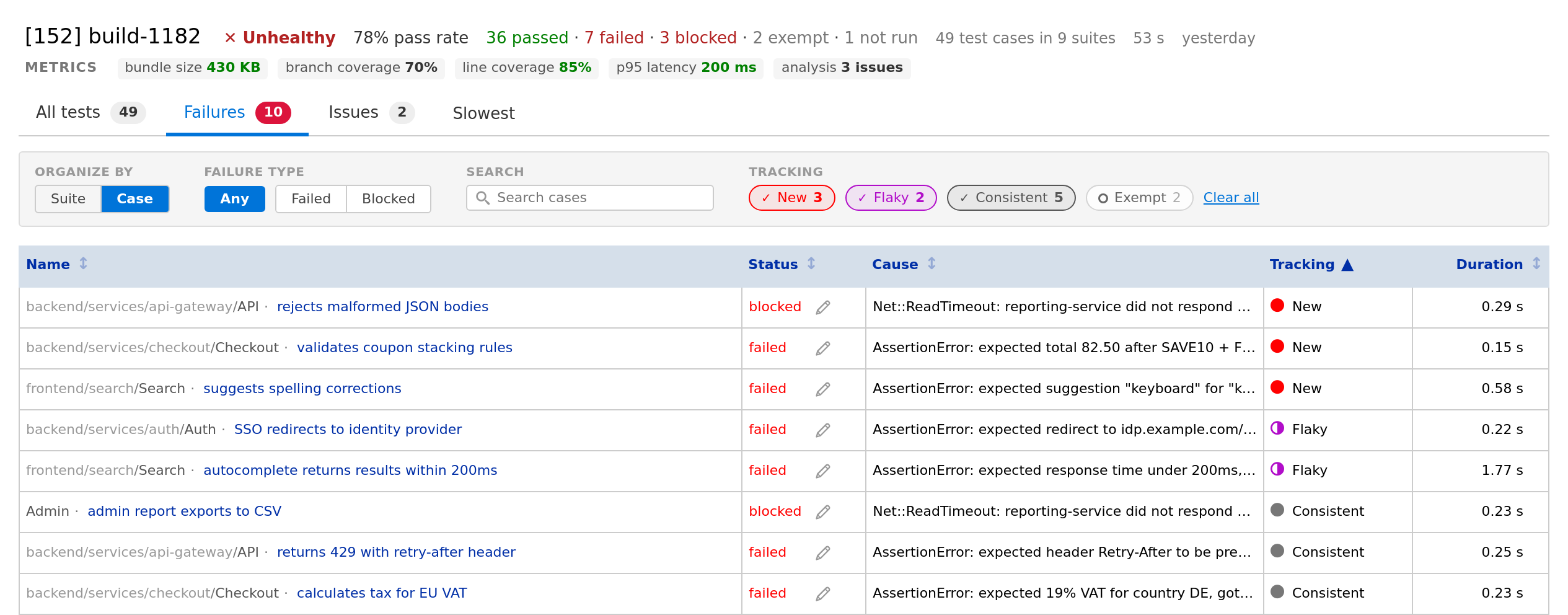
- The Failures view filters a result’s failures by state, so the flaky ones are a click away.
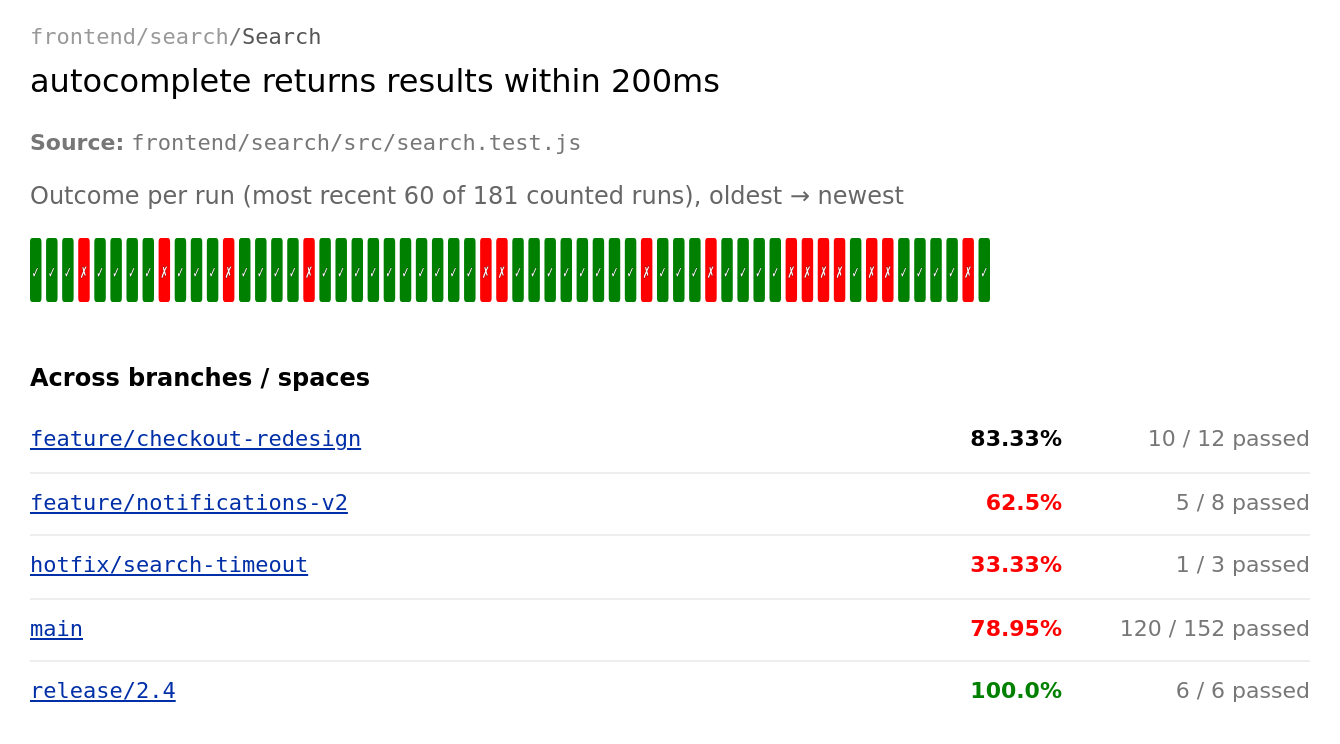
- Each test’s history shows its runs one by one, and its pass rate on each branch.
- Trends counts the flaky tests at the end of each month, for each Project and the whole Organization, lists them, and Needs attention flags a rise.
See Automated test results for the rest of what Testspace does with CI results, or look at a flaky test in the live demo: an autocomplete test that fails now and then on almost every branch, the pattern described above.
What to do with a flaky test
Finding a flaky test is half the job. Then:
- Decide who owns it. Link it to an issue in your tracker (Testspace links failures to Jira, GitHub, GitLab or Bitbucket issues), so the fix is planned work rather than something everyone ignores.
- Quarantine it if it can’t be fixed right away. Marking a known flaky test as Exempt (or as
xfailin pytest) keeps it visible but leaves it out of the pass rate and Health, so it no longer turns the result, or the commit’s check, red. Keep the list of exempt tests short and reviewed, or quarantine becomes a place tests go to be forgotten. - Fix the cause, not the symptom. Replace fixed waits with waits for a condition, isolate test data, stub external services, and make each test independent of the others’ order.
- Confirm the fix. A fixed test passes run after run. In Testspace, it’s resolved after five passes in a row, and the Flaky count in Trends goes down.
Summary
- Flakiness is a pattern across runs; a single run can’t show it.
- Reruns and automatic retries make builds green and hide how often tests really fail.
- Keep every result, track each test from run to run, compare across branches, and watch the count over time.
- Give each flaky test an owner, quarantine it only while it’s being fixed, and confirm the fix.
Try it on your own results
Start a free trial (14 days, no card needed), or explore the live demo, no sign-up needed. Questions? Contact us.